
Searching Cases by Name
The official Panola Odyssey Public Access portal splits its search menus in two. Civil, family, and probate cases sit on one side; criminal cases sit on the other. For a civil, family, or probate name, use the Party search. For a criminal name, use Defendant. Attorney search appears in both groups. Fields shift with the method you choose. A red plus beside bold red text marks what the form requires.
- Choose the case category before entering a name. Do not assume a felony, probate case, JP ticket, and city citation share one index.
- Select Party, Defendant, or Attorney as the Search By method. Enter the name in the fields the portal displays.
- Use Soundex when spelling is uncertain. For a partial name, place an asterisk after at least one character and leave Soundex off.
- Review all likely matches by court, style, filing date, and parties. Click the case-number hyperlink on the left to open case information.
- Record the cause number and event details. Contact the maintaining clerk if the result lacks a needed filing or current setting.
A shared last name is just a lead. It proves nothing on its own. Before you rely on a match, the court, the case style, the party's role, and the dates all have to line up with the matter you actually know about.
| Field Label | Type | Required | Notes |
|---|---|---|---|
| Search By | Selector | Yes | Civil: Case, Party, Attorney; criminal: Case, Defendant, Citation, Attorney |
| Party or Defendant | Name text | Mode-dependent | Soundex or wildcard may be used, but not together |
| Attorney | Name text | Mode-dependent | Exact bar-number filter was not confirmed |
| Soundex | Checkbox | No | Finds similar-sounding names |
| Search | Button | Action | Opens Search Results |
Panola County Odyssey Search Menu
The county portal's menu does some of the routing work for you. It offers Court Calendar. It also offers Civil, Family and Probate Case Records, plus Criminal Case Records. That menu is not proof a municipal or justice-court case exists in the system. A Carthage or Tatum citation can still live in the city's own records. A JP ticket can sit with JP 1 & 4 or JP 2 & 3 instead. The official public menu lays out these three broad routes on the court's own page.
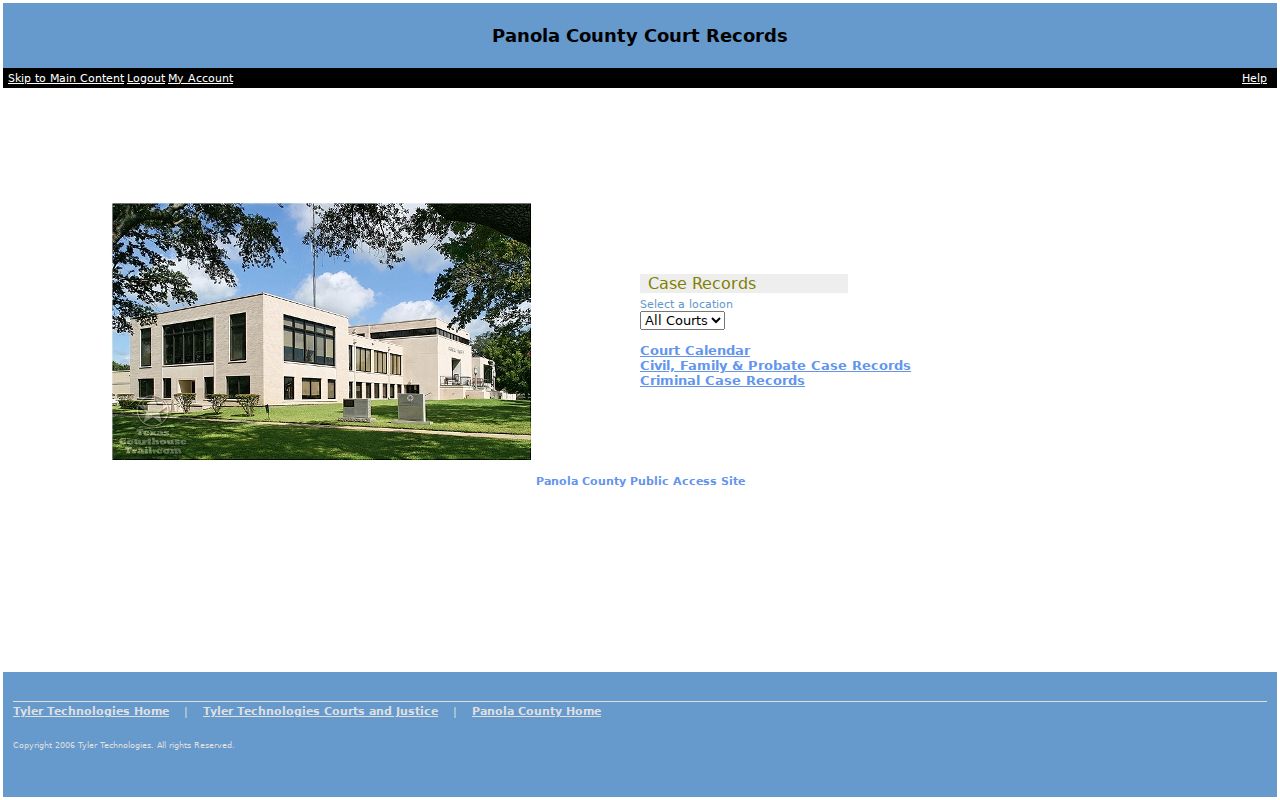
Those three routes are the whole public map. They keep you from typing a probate party into the criminal menu. They also stop you from mistaking Court Calendar for a full case-record search. One caution applies. The live portal has shown redirect and login loops for anonymous visitors. Check current access when you sit down to search. The help pages state no public search fee, no export tool, no update time, and no maximum result count. Assume none of those exist.
Searching by Case Number
A cause number is the strongest key for a Panola County case search. It points at one file and nothing else. Pick Case in the right category menu and type the number as the form allows. Odyssey's help does not publish one exact local format. Never invent a year, court, or case-type pattern. The number printed on your citation, pleading, notice, or clerk receipt is the source value. Trust that. Only part of the number? Odyssey allows a wildcard. A case or cross-reference search needs at least four characters before the asterisk, not counting dashes. So 1234* illustrates the rule, though it is not a real Panola cause number. Soundex works for names only. It cannot be paired with a wildcard. Once Search Results opens, click the case-number link on the left. If the number fails, retry under the correct case category. Confirm dashes or other marks with the clerk. Remember that a city citation number and a district cause number are different identifiers entirely.
Panola County Search Controls
The Odyssey help page goes deeper than the front menu. It documents required-field marks and mode-specific parameters. It also covers Soundex, wildcard limits, the Search Results screen, and the case-number link. The black header lists Logout, Search Menu, New Search, Back, and Help. With those controls, you can narrow a search or restart it. That beats treating the first match as final. The official help page spells out each documented search behavior.
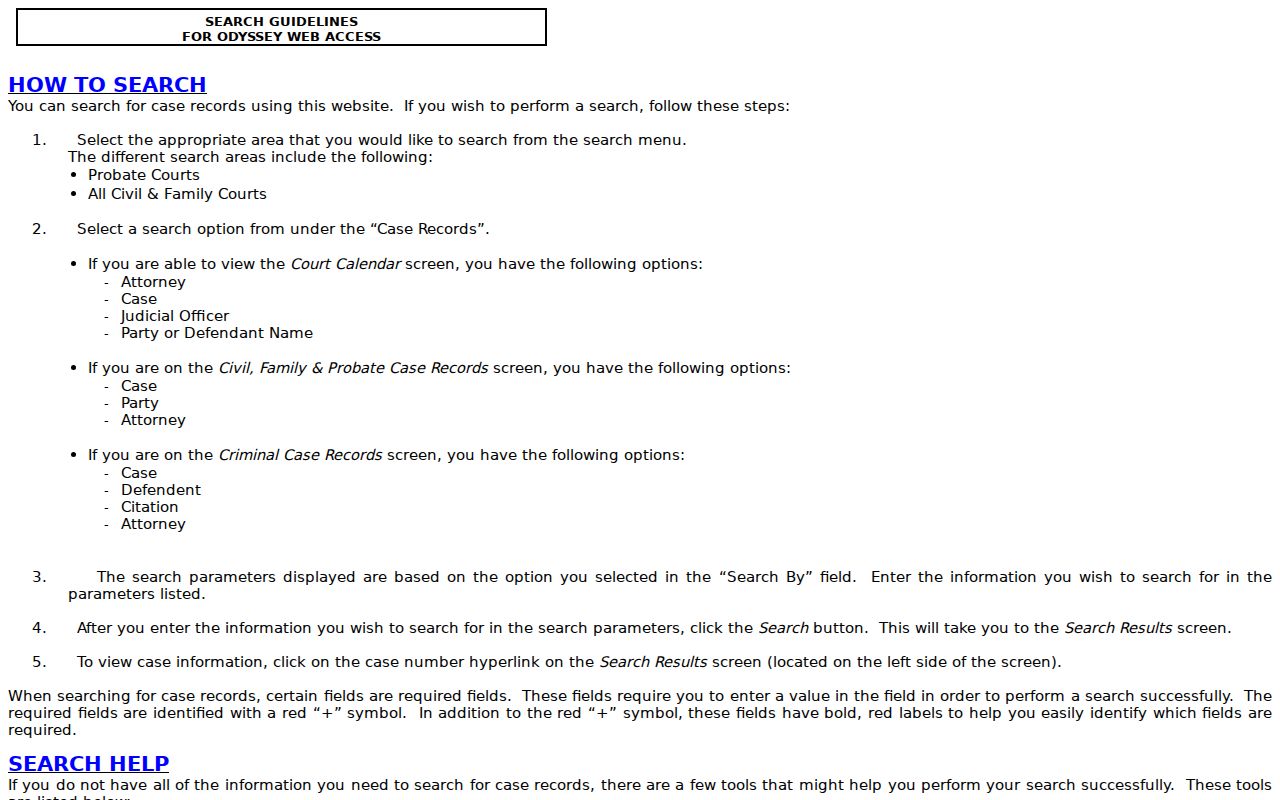
The documented behavior matches what the help page shows. One quirk: the official help misspells the criminal label as "Defendent." In normal use, call it Defendant.
- Soundex
- A name tool for words that sound alike. Do not combine it with an asterisk.
- Wildcard
- An asterisk after part of a name, cause number, or cross-reference number.
- Search Results
- The match list reached after submission.
- Register of Actions
- Panola Odyssey's name for the chronological list of case events.
Note: A search option describes a way to query the index. It is not a promise that every court or public document is included.
What a Case Search Returns
Odyssey help confirms that clicking the left-side case number opens case information; the finer details of the live record take a visit to confirm. So treat the field inventory as two kinds of items. Some are confirmed search concepts. Others still need live confirmation before you call them a guaranteed public display.
| Case Number | A confirmed result hyperlink and the key used for follow-up requests. |
|---|---|
| Filing Date | Expected case metadata; the live Panola field was not confirmed. |
| Court or Judge | The system is court-aware, and calendar search supports Judicial Officer; exact case-header placement is unconfirmed. |
| Case Type and Style | The menus split case categories; exact header labels need a live check. |
| Parties and Attorneys | Name-search modes are confirmed; public role labels and masking can vary. |
| Register Entries | The case information view provides event history, but event types and document links must be read as displayed. |
| Settings | Capture the court, date, time, cause number, style, type, judge, and associated names when shown. |
| Status or Disposition | Use only the portal or clerk's exact term; no fixed list was confirmed. |
| Documents | Some files may require re:SearchTX, an account, payment, or a clerk copy request. |
| Restriction | Sealing, expunction, juvenile rules, redaction, or portal limits can reduce what appears. |
A Register of Actions is an event index. It is not the filed pleading or the signed order itself. Note the event date and title, then pull the actual document whenever the precise wording matters.
No Panola County Search Result
A blank result does not mean no case exists. Check your spelling first. Also confirm the case category, the cause number, and the court named on the source document. Soundex helps with uncertain spelling; a wildcard helps with a partial term. Never use both at once. If the matter belongs to a JP or municipal court, leave Odyssey and call that local court directly. A district case that still will not appear needs the District Clerk. Contact Lindsey Smith at 903-693-0306, districtclerk@co.panola.tx.us, or Room 227 at 110 S Sycamore Street in Carthage. The office takes a record-request form. Requests can arrive by email, at the counter, by mail, or through another listed delivery route. Include the court, the party names, the date range, the event or document wanted, and the copy type.
Known number saves a search fee. The District Clerk form lists a $5 record search when the cause number or pleading is unknown.
Plain paper copies are listed at $1 per page. Ask the clerk for a current estimate and the right delivery method.
Plan on two to three business days for normal processing. The clerk asks requesters to allow up to ten. That is a request expectation, not a promise covering every Panola County case file.
Statewide vs County Case Search
Panola Odyssey and re:SearchTX do different jobs. The county system is where a Panola County docket search starts. It carries local case summaries and the Register of Actions. The District Clerk links re:SearchTX for statewide use. It offers online payment and document downloads. The same office adds a caution. The county does not maintain or provide technical support for that service.
| Point | re:SearchTX | Panola Odyssey |
|---|---|---|
| Reach | Statewide participating court-record route | Panola County public case and calendar menu |
| Best use | Statewide search and available paid document downloads | Known Panola case, category, or setting |
| Record depth | Depends on court participation and account access | Local case information and Register of Actions path |
| Support | Service operator, not the Panola clerk | Clerk for the court that maintains the record |
| Limits | Current fields and pricing were not fully inspectable | Does not guarantee all JP or municipal records |
The official re:SearchTX route is shown below.
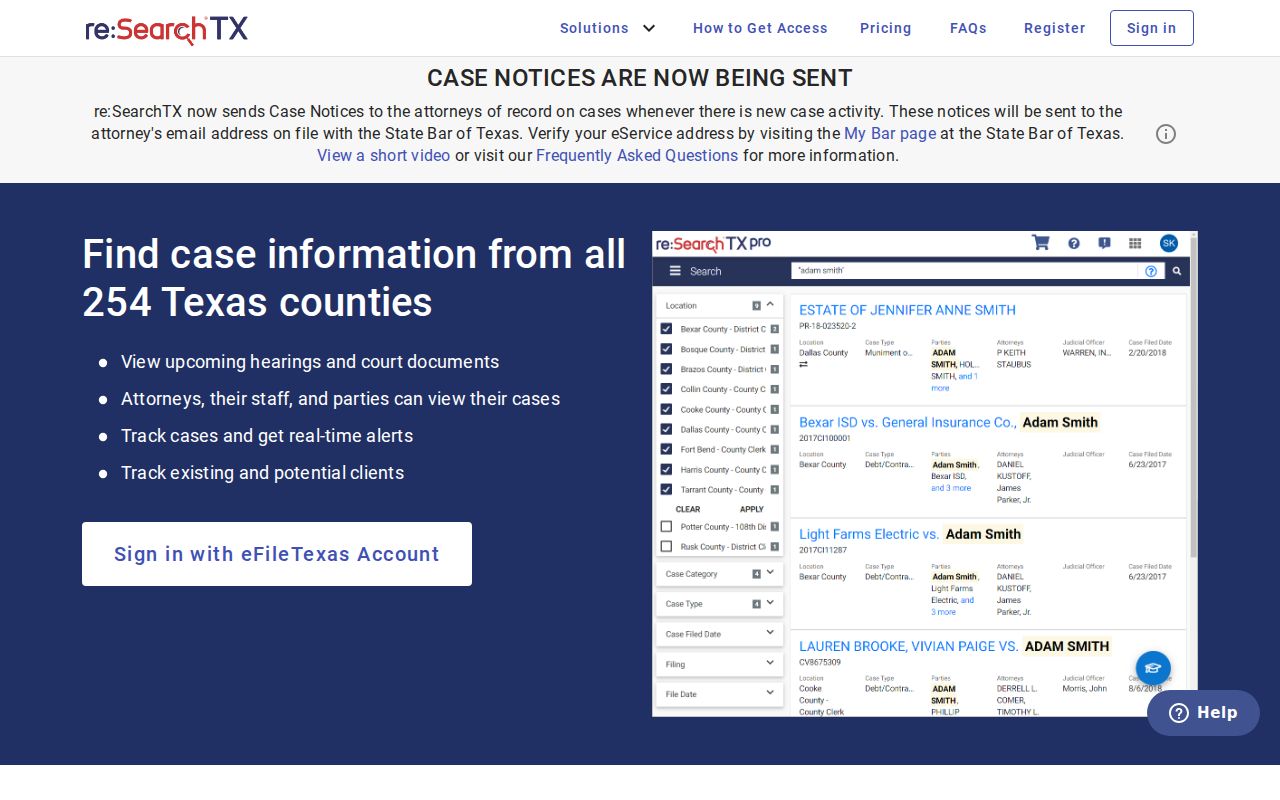
The statewide fallback is real, but a search record and a document download remain two different things.
Panola Filing Is Not Case Search
eFileTexas is the statewide electronic filing system. Authorized filers use it to submit documents to covered Texas courts. Panola civil and criminal courts appear on the active-court listing for mandatory e-filing. That fact does not turn eFileTexas into a public docket reader. The public path stays with Odyssey and, where available, re:SearchTX. A filed paper may sit for a while. It must be accepted, entered, or made visible under access rules. When a recent event is missing, ask the clerk. Ask whether it has been processed. Do not dig through the filer portal. Non-attorneys may be encouraged to e-file in covered matters. A filing choice is still separate from public record access. The gap bites hardest when someone holds a filing receipt but sees no event. The receipt concerns submission. The Register of Actions is the court's event record. Only the maintaining clerk can explain the status of a specific filing.
Panola Register Labels and Red W
The local docket name is Register of Actions. Treat it as a chronological case summary of events. A label may show that a motion, order, setting, plea, judgment, or other item was entered, but it should not be stretched into a legal conclusion beyond the words on the screen. Odyssey help also explains a red W beside a case number. It flags an active warrant or warrants. The symbol is a portal indicator, not a disposition field, and it never replaces direct confirmation from the clerk or court. Anyone worried about a warrant or a missed setting should call a licensed attorney and the proper court promptly. One more label deserves caution. The help calls "Converted Event" an internal-use item the public should disregard, so it is not a distinct ruling. A reset moves a setting without dismissing the case. And a disposition states a recorded resolution, not every fact behind it.
Access and Restricted Cases
Public access to Panola County case records has legal limits. A sealed civil record is controlled by the applicable court rule and order. Texas Code of Criminal Procedure Chapter 55A supplies the expunction framework. Texas Family Code Chapter 58 imposes juvenile confidentiality rules. State privacy and redaction rules can also mask personal identifiers in public filings.
A missing name, event, or image may reflect one of those limits, a portal coverage gap, or a technical problem. Never read it as proof that no record exists. Do not try to bypass a restriction or reconstruct masked data. Ask the clerk about the right process. It must fit the exact case and document.
Texas Rule of Judicial Administration 12 governs many judicial administrative records. The Texas Judicial Branch Open Records Policy explains the difference. Court case records follow applicable court rules, laws, and court orders instead. The Texas Public Information Act is not a universal path. It does not open every adjudicative case file. A focused clerk request is the sound route. Name the cause number, court, event, date, and copy type.
Some files begin with the District Clerk. Those cover district felony, civil, family, juvenile, and child-protection matters. County-level cases may belong with the County Clerk. JP and municipal clerks keep their own local files. That split matters. It is central to an accurate Panola County case search.